
Aug 15, 2026 by Anthony York (YorkSoft Ltd)
Last Updated: August 15, 2026
Membership management software is a digital platform designed to automate and simplify the administration of member databases, dues collection, renewals, and communications for organisations ranging from professional associations to sailing clubs. Rather than juggling spreadsheets and email lists, these systems consolidate member data, automate recurring billing, and provide self-service portals where members can update information and access digital membership cards.
The core function is straightforward: centralise everything. Member contact details, subscription status, payment history, event registrations, and communication preferences live in one place. When a renewal date approaches, the system triggers an automated email and processes payment. When a member logs in, they see their profile, upcoming events, and downloadable credentials, all without staff intervention.

What separates modern membership management software from basic contact databases is automation. Workflows handle repetitive tasks that consume hours each month: sending renewal reminders, processing payments, updating member status, and generating reports. For associations with hundreds or thousands of members, this automation becomes essential. A small sailing club might manage with spreadsheets; a professional body with 5,000 members cannot.
The software also bridges the gap between your organisation and your members. Self-service portals reduce support requests. Email automation keeps members engaged without manual effort. Analytics dashboards show which members are at risk of lapsing and which events drive retention, enabling data-driven decisions about membership tiers, pricing, and engagement strategies.
When evaluating membership management software, certain capabilities determine whether a platform will grow with your organisation or force you to migrate in two years.
| Feature | Essential | Important | Nice-to-Have |
|---|---|---|---|
| Member database with custom fields | Yes | , | , |
| Automated recurring billing | Yes | , | , |
| Self-service member portal | Yes | , | , |
| Email automation workflows | Yes | , | , |
| Event registration and ticketing | Depends | , | , |
| GDPR-compliant data handling | Yes | , | , |
| API for third-party integration | , | Yes | , |
| Role-based access control | , | Yes | , |
| Multi-channel communication (email, SMS) | , | Yes | , |
| Advanced reporting and analytics | , | Yes | , |
| Donor/sponsor management | , | Depends | , |
| Mobile app for members | , | , | Yes |
A platform without automated recurring billing forces your team to manually chase payments each month. No email automation means sending renewal reminders by hand. No self-service portal means members call you to update their address. These gaps don't sound critical until you're managing 2,000 members and your team is drowning in administrative work.
API connectivity and role-based access control become critical as your organisation scales. If you're using a separate event management tool or donor database, you need your membership platform to talk to those systems. Role-based access ensures your treasurer can view financial reports without seeing confidential member information, and your events coordinator can manage registrations without accessing billing data.
Data protection regulation in the UK is non-negotiable. Any membership platform handling personal information must comply with the Data Protection Act 2018 and the UK GDPR framework. This is a legal requirement that protects both your members and your organisation.
GDPR compliance means several concrete things. First, the platform must allow members to access their data on request, export it in a portable format, and delete their account entirely. Second, consent must be explicit and documented: you cannot assume a member who joined in 2010 consented to your current email marketing practices. Third, data must be encrypted both in transit and at rest. Fourth, the vendor must have a data processing agreement clearly defining how your member data is handled.
Many organisations discover their chosen platform lacks proper consent management only after a member requests deletion or a regulator asks questions. A platform that doesn't track which members consented to which communications, or that doesn't allow you to export member data in a machine-readable format, creates compliance risk. The software should make it easy to prove you have consent for every email you send.
Ask vendors whether data is stored within the UK or EU, whether backups are encrypted, and what happens to your data if the vendor is acquired. A reputable provider will have a clear data residency policy and a documented incident response plan. If a vendor cannot answer these questions directly, that's a warning sign.
YorkSoft Ltd understands that custom web applications often need to handle sensitive member data, and we ensure that any bespoke membership system we build incorporates data protection by design. For organisations with specific GDPR requirements, perhaps member data stored only in certain jurisdictions or audit trails for compliance reporting, a custom solution often provides better control than a generic SaaS platform.
Membership management software pricing varies widely, and understanding the model matters more than the headline figure. Most platforms use one of three approaches: per-member pricing, tiered feature pricing, or usage-based pricing.
Per-member pricing charges you based on how many active members you have. This model scales with your organisation; when you grow, costs grow proportionally. The advantage is predictability; the disadvantage is that a large membership base becomes expensive quickly.
Tiered feature pricing sets a fixed monthly fee based on which features you unlock. You might pay for basic member database and email, then upgrade to add event registration or advanced reporting. This model works well if you know exactly which features you need. The trap is paying for features you don't use or discovering mid-year that you need a higher tier.
Usage-based pricing charges for specific actions: each email sent, each payment processed, each event registration. This model appeals to smaller organisations with unpredictable activity levels, but it can become expensive as you scale.
Additional costs often hide in the fine print. Payment processing fees typically run 2-3% plus a fixed amount per transaction. Some platforms charge extra for SMS communications or API calls beyond a monthly limit. A platform quoting one price might actually cost significantly more once you factor in payment processing and support add-ons.
The total cost of ownership extends beyond software fees. Consider staff time spent on setup, training, data migration, and ongoing administration. A cheaper platform requiring 40 hours of manual configuration can cost more in labour than a more expensive platform that automates the work. This is where custom solutions from providers like YorkSoft Ltd can make financial sense. If your organisation has unique requirements that off-the-shelf platforms don't address, building a bespoke system can offer a strong return on investment over time compared to forcing your workflows into a generic tool.
Automated membership renewal is the feature that saves the most staff time. Instead of manually tracking renewal dates, sending reminders, and processing payments, the system handles the entire cycle.
A typical automated renewal workflow operates as follows. The system identifies members approaching their renewal date, typically 30 days before expiry, and sends an automated email reminder with a renewal link. The member clicks the link, reviews their membership details, updates their address if needed, and processes payment. The system confirms the renewal, updates the member's status, and logs the transaction.
If payment fails, the system sends a follow-up reminder. Some platforms allow multiple retry attempts with escalating urgency. A member might receive a gentle reminder after the first failed attempt and a more direct notice after the second, recovering payments that a single reminder would miss.
The system also handles edge cases. A member might request to pause their membership for a year rather than cancelling and re-enrolling. A member might upgrade to a higher tier mid-cycle; the system prorates the charge and adjusts their renewal date. These nuances matter for member retention.
Analytics on renewal performance reveal patterns. You can see which member segments have high renewal rates and which are at risk. Perhaps members who attend events renew at 95%, while inactive members renew at 60%. This insight lets you target engagement efforts where they matter most. The automation also reduces errors: every transaction is auditable, which matters for financial reporting and member disputes.
Not all membership platforms are equal. Certain capabilities separate systems that scale from systems that frustrate you within a year.
Member database flexibility is foundational. You need to store standard fields, name, email, address, phone, but also custom fields specific to your organisation. A sailing club needs to track boat class and sailing level. A professional association needs to track certifications. A platform with rigid fields forces you to work around its limitations. Look for systems that let you add custom fields without coding and that allow members to update certain fields themselves via the portal.
Payment gateway integration determines whether you're stuck processing payments manually. The platform should integrate with major payment processors so payments flow directly into your bank account. Avoid systems that require manual fund transfers or charge excessive transaction fees.
Email automation should go beyond simple reminders. You need conditional logic: if a member hasn't attended an event in six months, send them a re-engagement email. If a member upgrades their tier, send them a welcome email. If payment fails, trigger a retry sequence. Better systems let you build multi-step workflows based on member behaviour.
Role-based access control protects sensitive data and prevents accidental changes. Your treasurer needs access to financial reports but not member health information. Your events coordinator needs to manage registrations but not billing. The platform should enforce these permissions at the database level.
Reporting and analytics should answer real questions: which membership tiers are growing, what's your renewal rate by cohort, which members are at risk of lapsing, how much revenue comes from each member segment. Platforms offering only basic member counts are insufficient for strategic planning.
Integration capabilities matter as your organisation grows. Your membership platform should integrate via API so data flows between systems without manual export-import cycles, preventing data silos and reducing errors.
Selecting membership management software is a decision that affects your organisation for years. A poor choice means either living with limitations or undertaking a costly migration.
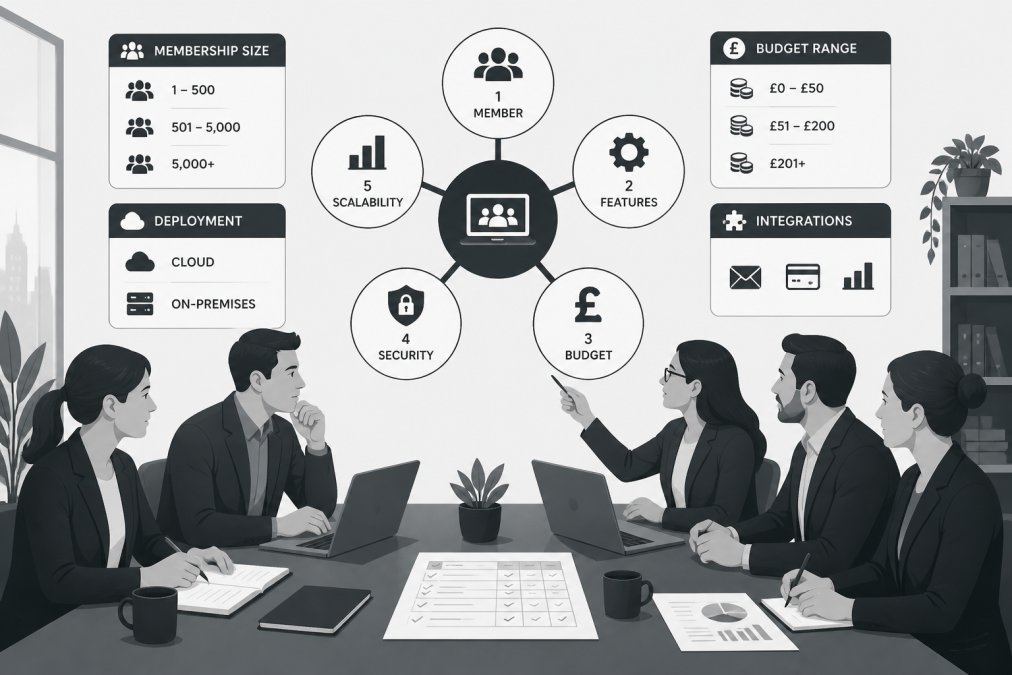
Start by mapping your actual requirements, not theoretical ones. Document what your team does monthly: send renewal reminders, process payments, manage event registrations, generate financial reports, communicate with members. Identify pain points in your current process. If your biggest frustration is manual payment chasing, prioritise platforms with strong payment automation.
Involve your team in the selection process. Your treasurer needs to understand financial reporting capabilities. Your communications person needs to evaluate email automation. Your events coordinator needs to test event registration workflows. Ask vendors for trial access and have your team actually use the system for a week, not just watch a presentation.
Test data migration with a small sample before committing. How does the platform import your existing member data? Can it handle your custom fields? A vendor that makes migration easy is worth premium pricing; a vendor that makes it painful creates months of headaches.
Evaluate the vendor's stability and roadmap. Is the company profitable? How many customers do they have? Do they have a published roadmap showing planned features? Will they support the platform in three years?
Consider total cost of ownership, not just software fees. Factor in setup time, training, and ongoing support. For organisations with complex or unique requirements, YorkSoft Ltd can build a custom membership application tailored to your exact workflows. This approach can offer a strong return on investment over time compared to forcing your organisation into a generic platform.
Assess support quality before you need it. Can you reach support by phone or only by email? What's the response time for critical issues? Is there a knowledge base? Support quality matters when you're in a crisis.
Finally, plan for growth. A platform that works for 500 members might struggle at 5,000. Evaluate whether the vendor's architecture scales and whether they support the advanced features you'll need as you grow.
Choosing membership management software requires balancing features, cost, and fit with your organisation's unique needs. For most associations and clubs, a well-chosen SaaS platform handles the job efficiently. For organisations with complex workflows, regulatory requirements, or integration needs, a custom solution built by YorkSoft Ltd offers control and scalability that generic platforms cannot match. Whatever path you choose, involve your team, test thoroughly, and prioritise platforms that automate your actual pain points. The right system should feel invisible, allowing your team to focus on serving members, not managing the software.
Prioritise automated renewal systems, a robust member database with CRM synchronisation, payment gateway integration for dues collection, role-based access control, and self-service portals where members can update their information. Email automation, event registration capabilities, and reporting dashboards are essential for engagement tracking. Ensure the platform supports multi-channel communication and offers API connectivity for custom integrations with your existing systems.
GDPR compliant membership management platforms include built-in data protection features such as consent management, automated data retention policies, and audit trails for all member interactions. They provide members with self-service access to their data, enable easy data export requests, and support secure data deletion. Look for platforms with encryption, role-based access controls, and regular security updates to meet Information Commissioner's Office requirements.
Membership software pricing models typically include per-member fees (charged monthly or annually based on active members), tiered subscription plans (basic, standard, premium), transaction-based fees (percentage of dues collected), and enterprise custom pricing. Some platforms combine multiple models, for example, a base subscription plus per-member charges. Evaluate total cost of ownership by factoring in setup fees, data migration costs, training, and support rather than focusing only on monthly fees.
Yes, most modern platforms support data migration, though the complexity depends on your current system's format and data quality. Migration workflows typically involve data mapping, validation, and testing before going live. Plan for potential downtime and ensure your team is trained on the new system before the switchover. Custom development solutions like those offered by specialised providers can handle complex migrations with minimal data loss and ensure seamless integration with your existing processes.
Cloud-based platforms are hosted by the provider, require no installation, offer automatic updates, and are accessible from anywhere with internet connectivity. Self-hosted solutions run on your own servers, giving you more control over data but requiring IT resources for maintenance and security. Cloud-based options typically have lower upfront costs and better scalability, whilst self-hosted solutions may offer greater customisation through API connectivity and bespoke development for organisations with unique requirements.