
Oct 09, 2026 by Anthony York (YorkSoft Ltd)
Last updated: October 8, 2026
Business process automation tools eliminate manual tasks that drain time and create errors. These systems let your team focus on strategy while routine work runs automatically. For small businesses around Northampton and across the UK, the right automation tool transforms how you operate, reducing costs, speeding delivery, and cutting the mistakes that come with manual handling.
The challenge most small business owners face is simple: they're doing too much by hand. Invoicing, data entry, report generation, email follow-ups, customer notifications, these tasks pile up quickly. Each one pulls a team member away from higher-value work. Automation addresses this directly by handling repetitive processes without human intervention.
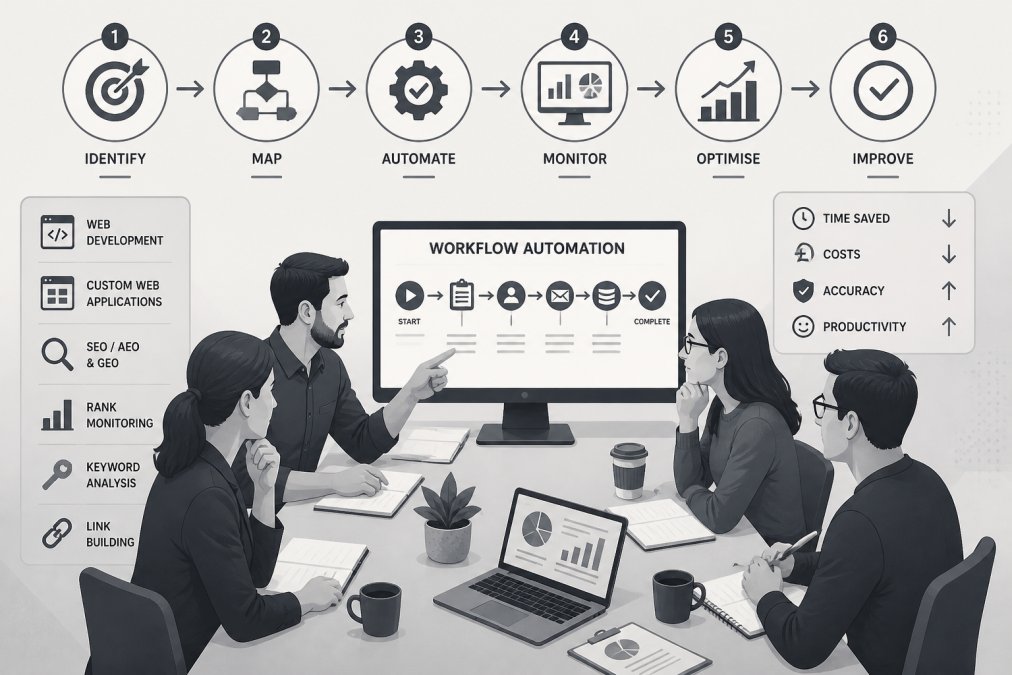
When you automate a process, you gain three immediate benefits. First, speed: tasks that took hours now complete in minutes. Second, consistency: the same process runs the same way every time, eliminating human variation. Third, cost control: fewer manual hours means lower labour costs and fewer costly errors.
Understanding what automation can do is easier when you see real examples. Consider invoice processing: instead of manually entering invoice data into your system, automation reads the invoice, extracts key information, matches it to purchase orders, and logs it, all without anyone touching a keyboard. A similar approach works for customer onboarding, where new sign-ups automatically trigger welcome emails, account setup, and permission assignments.
Another common example is report generation. Many teams spend hours each week pulling data from different systems, formatting it, and sending it to stakeholders. Automation collects the data, formats it, and distributes it on schedule. The team never touches it.
Email workflows are equally powerful. When a customer abandons a purchase, automation can send a reminder after 24 hours, a second message after 3 days, and a final offer after a week, all without manual intervention. The same logic applies to lead follow-ups, customer support escalations, and renewal reminders.
For Northampton-based service firms, automation often focuses on appointment scheduling, client communication, and invoice payment reminders. Professional associations benefit from member management automation, renewal notices, event registrations, and directory updates happen without staff involvement. E-commerce businesses automate inventory alerts, order confirmations, and shipping notifications.
:::Key takeaway The best automation targets processes that run the same way repeatedly. If a workflow changes every time, automation adds complexity rather than value.
Automating a process requires a clear method. Start by mapping the current workflow. Write down every step, every decision point, and every system involved. This forces you to see where time actually goes and where errors creep in.
Next, identify the automation trigger. What event starts the process? A customer submitting a form, an invoice arriving, a deadline approaching? The trigger is what tells your automation tool to begin.
Then define the actions. What should happen after the trigger fires? Send an email, create a record, update a spreadsheet, notify a person, move a file? List these in order.
Finally, test with a small group before rolling out to everyone. Automation that works for 10 records might fail on edge cases you haven't seen. Testing catches these problems early.
The process itself is straightforward, but success depends on choosing the right tool for your needs. YorkSoft Ltd can help you design automation that fits your specific workflows, especially when you need custom integration with your existing systems or bespoke web applications built to your exact specifications.
No-code automation tools let you build workflows without writing code. They're faster to set up than custom solutions and require no programming knowledge. For many small businesses, they're the natural starting point.
No-code tools work best when your processes are straightforward and your systems are well-known. If you need to connect Salesforce to your email platform and trigger notifications based on customer behaviour, no-code tools handle this easily. They excel at linking popular business software together.
Where no-code tools struggle is with unique business logic. If your process requires custom calculations, complex conditional logic, or integration with systems the tool doesn't support, you'll hit limits quickly. You'll end up working around the tool rather than with it.
The decision often comes down to cost and complexity. No-code tools cost less upfront and deploy faster. Custom solutions cost more but handle anything you need. As you grow and your needs become more specific, custom automation from a development partner like YorkSoft Ltd becomes worthwhile.
| Approach | Setup Time | Monthly Cost | Best For | Limitation |
|---|---|---|---|---|
| No-code platform | Days | Low-moderate | Standard workflows, popular apps | Limited custom logic |
| Custom solution | Weeks | Moderate-high | Unique processes, legacy systems | Requires developer |
| Hybrid approach | 1-2 weeks | Moderate | Mix of standard and custom | More complexity to maintain |
Successful automation follows a few consistent patterns. First, start small. Pick one process, automate it, measure the result, then move to the next. This approach builds momentum and confidence without overwhelming your team.
Second, involve the people doing the work. They understand the process better than anyone. Their input catches edge cases and ensures the automation actually solves the problem they face daily.
Third, monitor and adjust. Automation isn't set-and-forget. Review your workflows quarterly. Look for processes that have changed, tools that no longer work well together, or steps that need refinement. The best automation improves over time.
Fourth, document everything. Write down what each automation does, why it exists, and who to contact if it breaks. This matters especially when team members change or when you need to troubleshoot issues.
Finally, prioritise integration. Automation that connects your systems is far more powerful than automation within a single system. When your CRM talks to your email platform, which talks to your accounting software, data flows seamlessly and errors drop dramatically.
Off-the-shelf automation tools offer speed and lower cost. You sign up, configure a few settings, and you're running. They work well when your needs match what the tool was designed to do.
Custom solutions take longer and cost more, but they do exactly what you need. They integrate with your legacy systems, handle your unique business logic, and scale as you grow. For businesses with specific requirements, especially those in Northampton's professional services sector or e-commerce space, custom automation often delivers better long-term value.
The choice depends on three factors: budget, timeline, and complexity. If you need something running in weeks and your process is standard, an off-the-shelf tool is the answer. If you have months to implement, your process is unique, and you want something built specifically for your business, custom development makes sense.
Many businesses use both. They start with off-the-shelf tools for standard processes, then add custom solutions where they need more control. This hybrid approach balances cost, speed, and capability.
Choosing the right automation approach depends on understanding your specific workflows and your team's capacity to manage change. YorkSoft Ltd specialises in custom web development and process automation that integrate seamlessly with your existing systems. Whether you need no-code solutions or bespoke development, we can help you design automation that actually works for your business. Contact us to discuss your automation goals and discover how we can simplify your operations.
Workflow automation handles individual task sequences, like sending an email when a form is submitted. Business process automation covers entire end-to-end workflows across multiple systems and teams. For example, an invoice-to-payment process involving approval, ledger entry, and vendor communication is business process automation. Most small businesses benefit from starting with workflow automation before scaling to full process automation.
Yes, no-code tools work well for straightforward workflows like data entry, email notifications, and file management. However, if your small business requires integration between your retail management system and website, or bespoke database logic for member management, no-code platforms often hit their limits. That's where custom development from specialists becomes necessary to handle your specific requirements without costly workarounds.
Prioritise high-volume, repetitive tasks that consume the most staff time: invoice processing, customer onboarding, lead follow-up, and data entry between systems. These deliver quick wins and free up your team for higher-value work. Track which processes cause bottlenecks or errors, those are your best candidates. Once you've automated the obvious ones, you'll have the foundation to tackle more complex workflows.
Before committing, ask potential developers for examples of similar integrations they've completed. Request technical documentation showing how they've connected systems like yours. Insist on a discovery phase where they map your current workflows and identify integration points. A reputable developer will provide this upfront and explain their approach clearly. YorkSoft's web development team specialises in bespoke integrations for e-commerce and membership platforms, contact them to discuss your specific setup.